Tradovate Group Trade 怎么用?跨 Prop Firm 为什么不行
Tradovate Group Trade: Setup Guide and 4 Limits Prop Firm Traders Must Know
Tradovate Group Trade 可以一键把订单同时发到多个账户,每个账户可以独立设置手数。但有一条限制很多人没注意:只能在同一家经纪商或同一个 prop firm 下的账户之间使用。Apex 账户和 Tradeify 账户不能放进同一个 group。
Tradovate Group Trade 是什么
Group Trade 是 Tradovate 内置的多账户下单功能。创建 Group 之后,选这个 Group 下单,订单自动分发到 Group 里的所有账户。每个账户可以设置不同的手数,不需要完全一致。通常也叫 trade copier,但 Tradovate 官方把它定义为 group trading,不是传统意义的 copier。
设置步骤
第一步:打开 Manage Groups
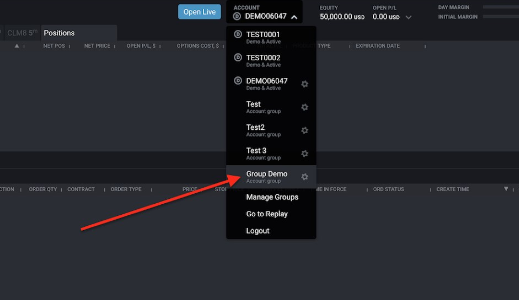
点击 Tradovate Web 或 Desktop 顶部的账户下拉菜单,选 Manage Groups。只有一个账户的话,这个选项不会出现。
第二步:创建 Group
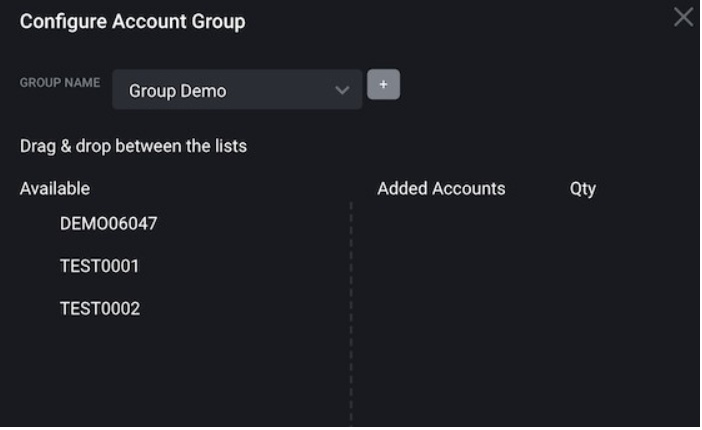
点击 + 按钮,给 Group 取个名字。可以创建无数个 Group,按策略或按 prop firm 分组。
第三步:添加账户和设置手数
从左侧 Available 列表把账户拖到右侧 Added Accounts。每个账户单独填写 Order Quantity,这个数字是每次下单时该账户收到的合约数。
第四步:选择 Group 下单
在顶部账户下拉菜单选中这个 Group,然后正常下单。订单会同时出现在 Group 里每个账户的 Orders 模块,持仓也会分别显示在各账户的 Positions 模块。SuperDOM 和 Chart 会显示整个 Group 的汇总盈亏。
下单时,数量必须是 Group 总手数的整数倍。比如 Group 总手数是 5,只能下 5、10、15……
Tradovate Group Trade 4 个重要限制
限制一:只能同一经纪商或同一 prop firm
这是最核心的限制。Tradovate 规定 Group Trade 只能在同一家经纪商下的账户之间使用。两个 Apex 账户可以组成一个 Group,一个 Apex 加一个 Tradeify 不行。Tradovate 普通经纪账户和 prop firm 账户也不能混用。
如果你同时跑多个 prop firm 的账户,需要用第三方工具。RepliKanto 在 NinjaTrader 8 里做跨 prop firm 的信号同步,不受 Tradovate 组织限制,并且支持独立手数比例。需要更多选择的也可以看 Affordable Indicators 里的跟单工具。
限制二:不支持 ATM Strategy
Group Trade 不支持 ATM Strategy。止损和止盈需要手动用 stop market 和 limit 挂单,配合手动 OCO 操作。用习惯了 ATM 的交易者需要注意这一点。
限制三:不支持手机 App
Group Trade 目前只在 Tradovate Web 和 Desktop 上可用,Tradovate Mobile App 不支持。
限制四:订单数量必须是整数倍
下单时的合约数必须是 Group 所有账户手数总和的整数倍。Group 里三个账户分别是 1、2、2 手,总共 5 手,就只能下 5、10、15……的单子,不能下 3 手或 7 手。
跨 Prop Firm 怎么办
Tradovate 官方文档明确说明:Tradovate 只提供 Group Trading,不提供 trade copier 功能。跨平台或跨 prop firm 的复制需要第三方工具。
选择逻辑很直接:同一 prop firm 的多个账户,用 Tradovate Group Trade,零成本,够用。需要跨 Apex、Tradeify、Lucid 等不同 prop firm 同步信号,用 RepliKanto 或 Affordable Indicators,支持独立手数比例,不受平台限制。
更多信息参考 Tradovate Group Trade 官方文档。
Tradovate Group Trade lets you submit one order that executes across multiple accounts simultaneously, with custom quantities per account. It is built into the Tradovate platform at no extra cost. The critical restriction: all accounts must be with the same brokerage provider or prop firm. An Apex account and a Tradeify account cannot be in the same group.
What Is Tradovate Group Trade
Group Trade is Tradovate’s native multi-account order routing feature. You create a group, add accounts, set a quantity for each account, and select the group when trading. One order submission distributes trades to every account in the group. Tradovate officially calls this group trading, not a trade copier, though traders use both terms.
How to Set Up Tradovate Group Trade
Step 1: Open Manage Groups
Click the account dropdown at the top of Tradovate Web or Desktop and select Manage Groups. This option only appears when you have more than one account linked.
Step 2: Create a group
Click the + button and name the group. You can create unlimited groups and organize them by strategy or prop firm.
Step 3: Add accounts and set quantities
Drag accounts from the Available list on the left to Added Accounts on the right. Set an Order Quantity for each account. This is the contract size each account receives per order submission.
Step 4: Select the group and trade
Select your group from the account dropdown and place orders normally. Individual orders for each account appear in the Orders module, and all positions show in the Positions module. The SuperDOM and Chart display aggregated PnL for the entire group.
Order quantities must be multiples of the group’s total quantity. If your group totals 5 contracts, you can only submit orders in sizes of 5, 10, 15, and so on.
4 Limits of Tradovate Group Trade
Limit 1: Same brokerage provider or prop firm only
This is the defining restriction. Tradovate only allows grouping accounts held with the same brokerage provider. Two Apex accounts can be grouped. One Apex account and one Tradeify account cannot. A standard Tradovate brokerage account and a prop firm account cannot be mixed either.
If you run accounts across multiple prop firms, you need a third-party tool. RepliKanto on NinjaTrader 8 handles cross-firm signal replication with independent lot size ratios per account. Affordable Indicators also includes trade copier tools for multi-account management.
Limit 2: No ATM Strategy support
Group Trade does not support ATM Strategies. Stop loss and profit target orders must be placed manually using stop market and limit orders with manual OCO setup. Traders who rely on ATM templates need to adjust their workflow.
Limit 3: Desktop and Web only
Group Trade is not available on the Tradovate Mobile App. Web and Desktop only.
Limit 4: Order size must be a multiple of group total
The quantity you enter when placing an order must be a multiple of the group’s total order quantity. If three accounts are set to 1, 2, and 2 contracts respectively for a total of 5, you can only submit orders in sizes of 5, 10, 15, and so on.
When Group Trade Is Not Enough
Tradovate’s own documentation is clear: Tradovate provides group trading, not a trade copier. Cross-platform or cross-firm replication requires third-party tools.
The decision is straightforward. Multiple accounts at the same prop firm: use Tradovate Group Trade, no cost, no extra software. Copying across Apex, Tradeify, Lucid, or other prop firms simultaneously: use RepliKanto or Affordable Indicators for independent lot sizing and cross-firm support.
For the full platform-side setup details, see the Tradovate Group Trade official documentation.